Skip to content

Statement of account

Show a customer what they were billed, what they paid and what is still due.

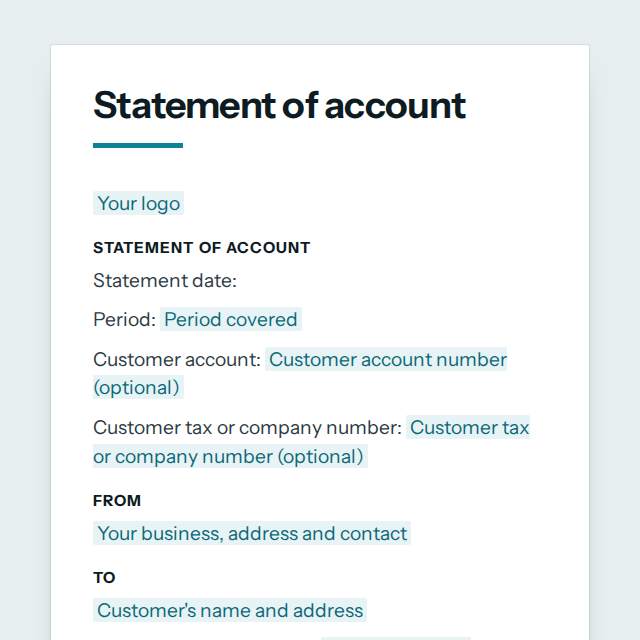
Statement of account template, first page

Fill it in and preview

Statement of account

Statement date: 21 November 2026
Period: 1 October to 31 October 2026
Customer account: C-2041
Customer tax or company number: P051234567Z

From

Savanna Supplies Ltd, 14 Kenyatta Avenue, Nairobi, Kenya, accounts@savannasupplies.example

To

Mombasa Fresh Foods, 2 Moi Avenue, Mombasa, Kenya

Balance brought forward: 12500.00

Activity

Date Reference Description Amount
3 Oct 2026 INV-0412 Invoice for goods delivered 125,000.00
18 Oct 2026 PMT-0077 Payment received, thank you -80,000.00

Balance due

57,500.00

Balance by age

  • Not yet due: 45,000
  • 1 to 30 days overdue: 12,500

Invoice INV-0391 of 2 September is 30 days overdue. Please pay it with this balance.

Please pay by 15 November 2026.
Bank transfer to Savanna Supplies Ltd, account 0112345678, quoting your customer number

If any item looks wrong, or a payment you made is missing, please tell us at once so we can correct it. Payments received after the statement date are not included. Credits shown reduce the balance; a negative balance means you have a credit with us.

Templates are a careful starting point, not legal advice. Where the law matters, check what applies where you are.

Finance and accounting

What this template is for

A customer statement of account listing invoices, payments and credits for a period, with the balance due, its age and how to pay. Word or PDF, free.

It is free to fill in online, needs no account, and downloads as a Word document or a PDF. See all Finance and accounting templates

Finance and accounting

What you fill in

The form asks for 14 details. The document fills itself in as you type.

  • Your business, address and contact

    For example: Savanna Supplies Ltd, 14 Kenyatta Avenue, Nairobi, Kenya, accounts@savannasupplies.example

  • Customer's name and address

    For example: Mombasa Fresh Foods, 2 Moi Avenue, Mombasa, Kenya

  • Customer tax or company number (optional)optional

    For example: P051234567Z

  • Customer account number (optional)optional

    For example: C-2041

  • Period covered

    For example: 1 October to 31 October 2026

  • Balance brought forward

    What the customer owed at the start of the period. Enter 0 if nothing.

    For example: 12500.00

  • Your logooptional

    Shown at the top of the document.

  • Currencyoptional

    Pick one and every amount is written as money in it. Leave it empty to show plain numbers.

  • Invoices, payments and credits

    One line for each. Enter an invoice as a positive amount, and a payment or credit as a negative amount.

  • Balance now dueoptional

    Worked out for you: brought forward plus invoices, less payments and credits.

  • Balance by age (optional)optional

    How much of the balance is not yet due, and how much is overdue and by how long. The amounts should add up to the balance due.

    For example: Not yet due: 45,000 1 to 30 days overdue: 12,500

  • Please pay by (optional)optional

    For example: 15 November 2026

  • Note on overdue items (optional)optional

    Name any invoice that is past its due date, and any late payment interest or charge your contract or the law allows.

    For example: Invoice INV-0391 of 2 September is 30 days overdue. Please pay it with this balance.

  • How to pay (optional)optional

    For example: Bank transfer to Savanna Supplies Ltd, account 0112345678, quoting your customer number

Finance and accounting

What is inside

The parts of this document, in order.

  1. 1From
  2. 2To
  3. 3Activity
  4. 4Balance due
  5. 5Balance by age

Templates

How it works

  1. 01

    Fill in

    Type your details in the form. The document fills itself in as you type; click any gap to jump to its field.

  2. 02

    Check

    Read it through. Gaps you have not filled stay marked, so nothing goes out half done.

  3. 03

    Download

    Save it as a Word document to edit further, or as a PDF to send or print.

Make it yours with AI

Open it in the chat and ask for changes: shorter, firmer, another situation, another language.

Adapt it with nerix

Finance and accounting

Questions people ask

What details does this template ask for?

The form asks for 14 details, starting with Your business, address and contact, Customer's name and address, Period covered, Balance brought forward, Invoices, payments and credits. 9 more are optional.

Can I download this template as Word or PDF?

Yes. When you have filled in the form, save it as a Word document to keep editing, or as a PDF to send or print. It is free and needs no account.

Is what I type sent anywhere?

No. What you type stays in your browser while you fill in the document. It only goes to nerix if you choose to open the template in the chat.

What should I check before I use this template?

The balance is worked out from the lines you enter as invoices less payments and credits. Check it against your accounting records before sending. A statement is a reminder of what your books show, not a new invoice: do not use it to charge tax, and keep the invoices behind each line as proof. Late payment interest or charges are allowed only as your contract or the law provides, and consumers are often more protected. Whether a statement affects the time limit for collecting an old debt depends on the country: in some, such as Spain and Sweden, a written demand from the creditor stops that time running out; in many others only the customer's acknowledgment, a payment or a court claim does.

Are these finance templates free?

Most are. Fill in and download them for free as Word or PDF, with no account. A few longer documents are premium: free to fill in, paid once to download, and marked with their price.

Do these templates include tax rules?

No. Tax and invoicing rules differ by country. Each template has fields for amounts and references, and you add the tax details your local rules require.

Can I use them with my accounting software?

Yes. They are plain documents. Download the Word version, or copy the figures into your software.