Product, Automations, Early access
Work that happens by itself, until a person has to say yes.
Say when it should run and what nerix should do. Every Monday, after each meeting, 30 days before a contract ends. It runs as you, with what you are allowed to do, and anything that reaches other people waits for your yes.
The free plan is one seat and 3,000 credits a month, never charged.
01When and then
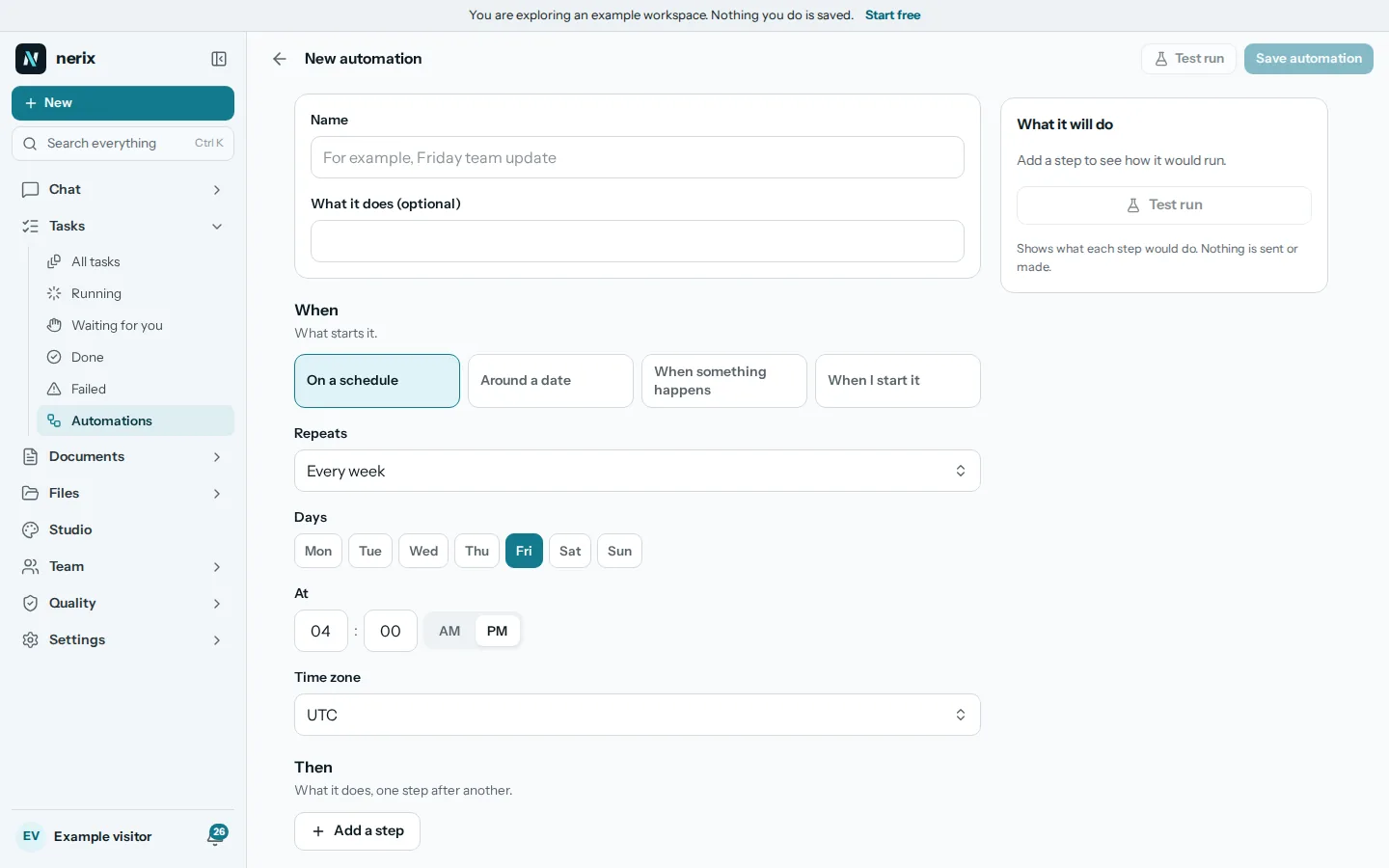
Choose when it starts and what it does, one step after another.
An automation starts on a schedule (every day, on weekdays, on a weekly day, the last working day of the month, every quarter), around a date it finds in your data, when something happens (a file is added, an email arrives, a meeting ends, a task becomes overdue, everyone signed), or when you start it.
Then it does its steps: ask nerix over your files, find tasks or files, remind you, draft or send an email, make a document or a workbook, make tasks, post in a space, start a feedback round or a check. A step can be conditional, or repeat for each task, row or person.
What nerix does here
- Make one from the chat: type /automate, or just say "every Monday at 9 remind me of overdue tasks", in any language.
- nerix shows the plan as a card with the next three run times and the most it can cost. Nothing is saved or run before you press Save.
02Recipes
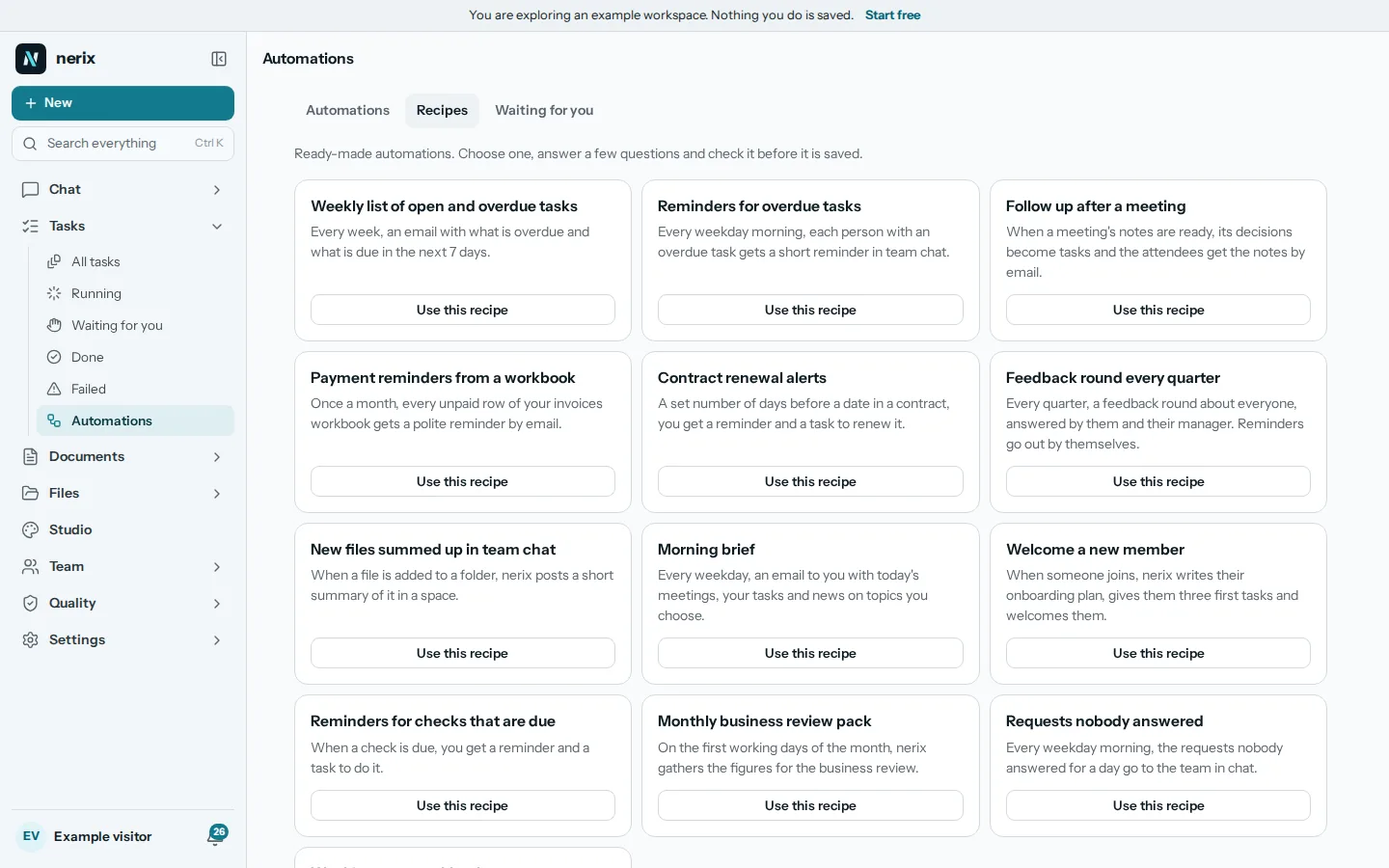
Start from a ready-made automation and check it before it is saved.
Pick a recipe, answer a few questions and the builder opens already filled in. There are recipes for a weekly list of open and overdue tasks, reminders for overdue tasks, a follow up after a meeting, payment reminders from a workbook, contract renewal alerts, a feedback round every quarter, a morning brief and a welcome for a new member.
There are also recipes for check reminders, the monthly business review pack and requests nobody answered for a day. A recipe is only a starting point: you can change every step.
03Waiting for you
Anything that reaches other people waits for your yes.
An email, a signing request, a post, a feedback round or a meeting invite waits for you, with exactly what would go out. Approve it, approve all of a list at once, or decline and either stop the run or skip that step. An email only to yourself needs no yes.
Nothing answered within three days, or the time you set, stops that run. nerix tells you in the bell and by email when something waits. "Send without asking" is off by default and is set for one automation at a time.
- ApproveSend exactly what you were shown.
- Approve allOne yes for the whole list of a For each step.
- DeclineStop the run, or skip this step and go on.
- Not answeredAfter three days, or the time you set, the run stops.
04Limits and history
A test run first, a cap on credits and a log of everything.
A test run shows what each step would do without sending or making anything. Each automation has a most credits per run and per month, and a run that would go over stops before the costly step. Three failed runs in a row pause it and say why.
Every change, run, step, answer and message sent is kept in the automation's history. Owners and admins see all the workspace's automations and can switch them off, but only the person who made one changes its steps.
- Test runShows every step's result. Steps that only look really look. Nothing is sent or made.
- Credit capsMost credits per run and per month, set from the estimate.
- Pauses itselfAfter three failed runs in a row, with the reason.
- HistoryWhat each step did and made, and the credits used.
05Questions
Questions
Is this finished?
It is early access. Automations work in the app today and recipes are being added. It is new, so some things are still missing. Tell us what you need.
Can an automation email my customers without asking me?
Only if you switch on Send without asking for that one automation. It is off by default, and anything that reaches other people waits for your yes until you do.
Who does an automation act as?
As the person who made it, with what that person is allowed to do at that moment.
How do I stop an automation from using too many credits?
Each one has a cap per run and per month. A run that would go over stops before the costly step, and you can see the credits used in its history.
Can I make one by talking to nerix?
Yes. Type /automate and say what you want, in any language. A word that only says how often something happens, such as a monthly report, is written as that document. Say when to do it to get an automation.
Need something this does not do? We build it into your workspace. Built for you
- Tasks and projectsTasks, cases and projects as a list, a board, a table or a calendar.
- MeetingsAgenda, live notes, minutes and action items, filed as tasks.
- E-signaturesSend a document to be accepted or signed, with a record of every step.
- ChatAsk across everything you own, with every sentence sourced.
- All productsEvery nerix product in one list.
Keep reading
Teamwork5 min read
Workflow automation for a small business, what to automate first
Workflow automation for a small business: ten routines worth automating first, how to test one safely, and how to pick between Zapier, Make, n8n and others.
Comparisons and alternatives4 min read
Zapier alternatives for small business
Zapier alternatives compared for small teams: Make, n8n and built-in automations. Prices, free plan limits and which one suits which kind of work.