Skip to content

Shipping confirmation email

Tell a customer their order is on its way, with carrier, tracking and expected delivery.

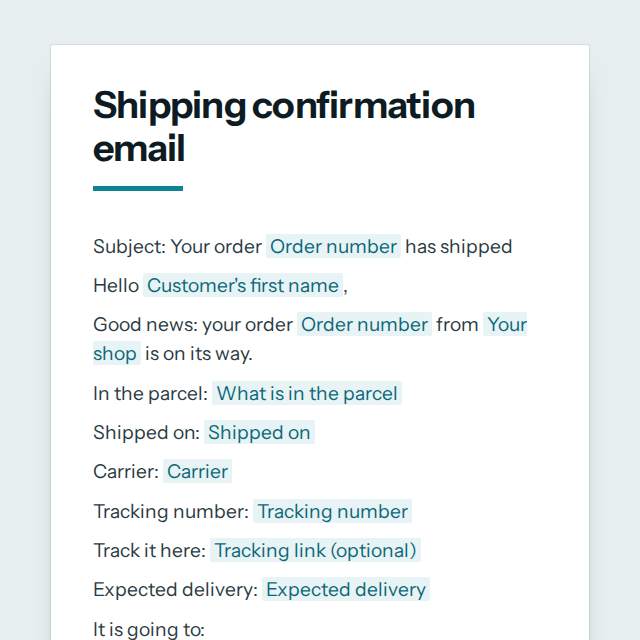
Shipping confirmation email template, first page

Fill it in and preview

Subject: Your order AC-7731 has shipped

Hello Mateo,

Good news: your order AC-7731 from Andes Coffee Roasters is on its way.

In the parcel: 2 bags of Huila coffee, 250 g each
Shipped on: 18 November 2026
Carrier: Servientrega
Tracking number: ST123456789CO
Track it here: https://track.example/ST123456789CO
Expected delivery: between 21 and 24 November

It is going to:
Calle 72 #10-34, Bogota, Colombia

A signature is needed on delivery. Customs duties, if any, are collected by the carrier.

If nobody is home, the carrier may leave a card or a safe-place note. If your parcel has not arrived by the end of the expected delivery window, or arrives damaged, please reply to this email and we will sort it out.

Thank you for shopping with us.

Kind regards,
Camila at Andes Coffee Roasters

Templates are a careful starting point, not legal advice. Where the law matters, check what applies where you are.

Emails

What this template is for

A shipping confirmation email telling a customer their order has shipped: carrier, tracking number, expected date and what to do if it is late. Free to copy.

It is free to fill in online, needs no account, and downloads as a Word document or a PDF. See all Emails templates

Emails

What you fill in

The form asks for 13 details. The document fills itself in as you type.

  • Customer's first name

    For example: Mateo

  • Your shop

    For example: Andes Coffee Roasters

  • Order number

    For example: AC-7731

  • What is in the parcel

    For example: 2 bags of Huila coffee, 250 g each

  • Carrier

    For example: Servientrega

  • Tracking number

    For example: ST123456789CO

  • Tracking link (optional)optional

    For example: https://track.example/ST123456789CO

  • Shipped on

    For example: 18 November 2026

  • Expected delivery

    For example: between 21 and 24 November

  • Delivery address

    For example: Calle 72 #10-34, Bogota, Colombia

  • Delivery notes (optional)optional

    Signature rules, customs or import charges, or pickup point details.

    For example: A signature is needed on delivery. Customs duties, if any, are collected by the carrier.

  • How to reach you

    For example: reply to this email

  • Sent by

    For example: Camila at Andes Coffee Roasters

Emails

What is inside

The parts of this document, in order.

  1. 1Subject: Your order [Order number] has shipped
  2. 2Hello [Customer's first name],
  3. 3Good news: your order [Order number] from [Your shop] is on its way.
  4. 4In the parcel: [What is in the parcel]
  5. 5Shipped on: [Shipped on]
  6. 6Carrier: [Carrier]

Templates

How it works

  1. 01

    Fill in

    Type your details in the form. The email fills itself in as you type; click any gap to jump to its field.

  2. 02

    Check

    Read it through. Gaps you have not filled stay marked, so nothing goes out half done.

  3. 03

    Send

    Copy it, open it in your email app, or save it as a Word document or a PDF.

Make it yours with AI

Open it in the chat and ask for changes: shorter, firmer, another situation, another language.

Adapt it with nerix

Emails

Questions people ask

What details does this template ask for?

The form asks for 13 details, starting with Customer's first name, Your shop, Order number, What is in the parcel, Carrier. 2 more are optional.

Can I download this template as Word or PDF?

Yes. When you have filled in the form, copy the email, open it in your email app, or save it as a Word document or a PDF. It is free and needs no account.

Is what I type sent anywhere?

No. What you type stays in your browser while you fill in the document. It only goes to nerix if you choose to open the template in the chat.

What should I check before I use this template?

Give a delivery estimate you can keep, and check what your local law says about late or lost parcels. For international orders, say who pays customs duties and taxes.

Can I send the email straight from the page?

You can copy the finished email or open it in your email app with the subject and message already in place. nerix does not send mail for you from these templates.

Do the templates include a subject line?

Yes. Every email template starts with a subject line written to be clear and short, and you can change it like any other part.

Can I use an email template in another language?

Yes. Open the template in the nerix chat and ask for another language or tone, and check the result before you send it.

Is what I type stored anywhere?

No. The email is filled in inside your browser and nothing you type is sent until you choose to open it in the chat.