Skip to content

Welcome email series

Three welcome emails for new subscribers: hello, your best content, then a question.

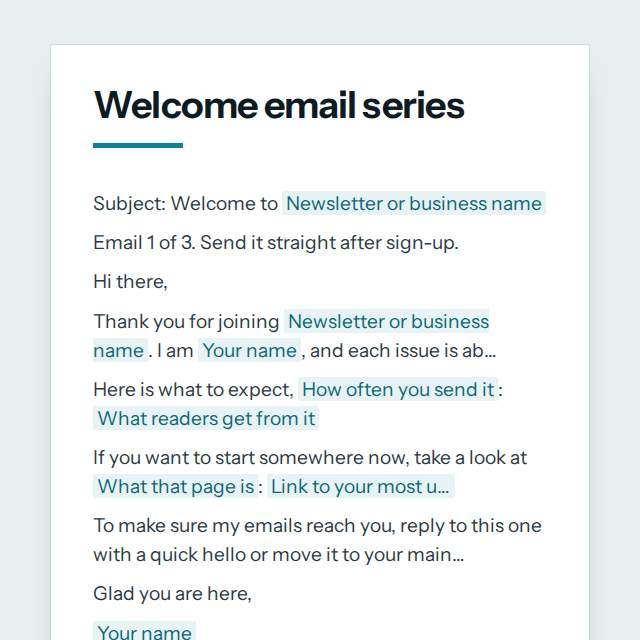
Welcome email series template, first page

Fill it in and preview

Subject: Welcome to The Slow Kitchen

Email 1 of 3. Send it straight after sign-up.

Hi there,

Thank you for joining The Slow Kitchen. I am Amara Okafor, and each issue is about simple, seasonal home cooking.

Here is what to expect, every Thursday morning: One recipe that takes under 40 minutes, a shopping list and one tip that saves waste.

If you want to start somewhere now, take a look at my Start Here guide: https://theslowkitchen.example/start-here

To make sure my emails reach you, reply to this one with a quick hello or move it to your main inbox.

Glad you are here,
Amara Okafor

You received this because you signed up to The Slow Kitchen. You can unsubscribe at any time with the unsubscribe link below.
The Slow Kitchen, 14 Mill Lane, Leeds LS1 4AB, United Kingdom

Subject: The most useful things on The Slow Kitchen

Email 2 of 3. Send it 2 days after sign-up.

Hi again,

You joined a few days ago, so here are the pages readers find most useful.

If you only have five minutes, open the first one. If you have more time, the second is where most people go next.

Talk soon,
Amara Okafor

You can unsubscribe at any time with the unsubscribe link below.
The Slow Kitchen, 14 Mill Lane, Leeds LS1 4AB, United Kingdom

Subject: A quick question for you

Email 3 of 3. Send it 5 days after sign-up.

Hi,

I would like to write about what matters to you, so I have one question: What is the one meal you wish you could cook better?

Just hit reply. I read every answer at amara@theslowkitchen.example and I use them to plan what comes next in The Slow Kitchen.

Thank you for reading,
Amara Okafor

You can unsubscribe at any time with the unsubscribe link below.
The Slow Kitchen, 14 Mill Lane, Leeds LS1 4AB, United Kingdom

Templates are a careful starting point, not legal advice. Where the law matters, check what applies where you are.

Emails

What this template is for

A welcome email series of three emails for new newsletter subscribers: say hello, share your best content, then invite a reply. Free to fill in and copy.

It is free to fill in online, needs no account, and downloads as a Word document or a PDF. See all Emails templates

Emails

What you fill in

The form asks for 14 details. The document fills itself in as you type.

  • Your name

    For example: Amara Okafor

  • Newsletter or business name

    For example: The Slow Kitchen

  • What the newsletter is about

    For example: simple, seasonal home cooking

  • How often you send it

    For example: every Thursday morning

  • What readers get from it

    One or two plain sentences.

    For example: One recipe that takes under 40 minutes, a shopping list and one tip that saves waste.

  • Link to your most useful page

    For example: https://theslowkitchen.example/start-here

  • What that page is

    For example: my Start Here guide

  • Link to a popular post or product

    For example: https://theslowkitchen.example/weeknight-dinners

  • What that second link is

    For example: my five most-cooked weeknight dinners

  • A question for readers to answer

    Something easy to answer in one line.

    For example: What is the one meal you wish you could cook better?

  • When to send email 2

    For example: 2 days after sign-up

  • When to send email 3

    For example: 5 days after sign-up

  • Your postal address for the email footer

    Many countries require a real sender address in marketing email. A business address or PO box works.

    For example: 14 Mill Lane, Leeds LS1 4AB, United Kingdom

  • Reply address

    For example: amara@theslowkitchen.example

Emails

What is inside

The parts of this document, in order.

  1. 1Subject: Welcome to [Newsletter or business name]
  2. 2Email 1 of 3. Send it straight after sign-up.
  3. 3Thank you for joining [Newsletter or business name]. I am [Your name], and each issue is about [What the newsletter i...
  4. 4Here is what to expect, [How often you send it]: [What readers get from it]
  5. 5If you want to start somewhere now, take a look at [What that page is]: [Link to your most useful page]
  6. 6To make sure my emails reach you, reply to this one with a quick hello or move it to your main inbox.

Templates

How it works

  1. 01

    Fill in

    Type your details in the form. The email fills itself in as you type; click any gap to jump to its field.

  2. 02

    Check

    Read it through. Gaps you have not filled stay marked, so nothing goes out half done.

  3. 03

    Send

    Copy it, open it in your email app, or save it as a Word document or a PDF.

Make it yours with AI

Open it in the chat and ask for changes: shorter, firmer, another situation, another language.

Adapt it with nerix

Emails

Questions people ask

What details does this template ask for?

The form asks for 14 details, starting with Your name, Newsletter or business name, What the newsletter is about, How often you send it, What readers get from it.

Can I download this template as Word or PDF?

Yes. When you have filled in the form, copy the email, open it in your email app, or save it as a Word document or a PDF. It is free and needs no account.

Is what I type sent anywhere?

No. What you type stays in your browser while you fill in the document. It only goes to nerix if you choose to open the template in the chat.

What should I check before I use this template?

Only email people who signed up, ideally after confirming their address, and keep a working unsubscribe link and your postal address in every email. Consent and sender rules (such as GDPR, CAN-SPAM and CASL) differ by country, so check them for where your readers live.

Can I send the email straight from the page?

You can copy the finished email or open it in your email app with the subject and message already in place. nerix does not send mail for you from these templates.

Do the templates include a subject line?

Yes. Every email template starts with a subject line written to be clear and short, and you can change it like any other part.

Can I use an email template in another language?

Yes. Open the template in the nerix chat and ask for another language or tone, and check the result before you send it.

Is what I type stored anywhere?

No. The email is filled in inside your browser and nothing you type is sent until you choose to open it in the chat.