Skip to content

Follow-up email after no response

Nudge someone who has not replied, without pressure, and make the next step easy.

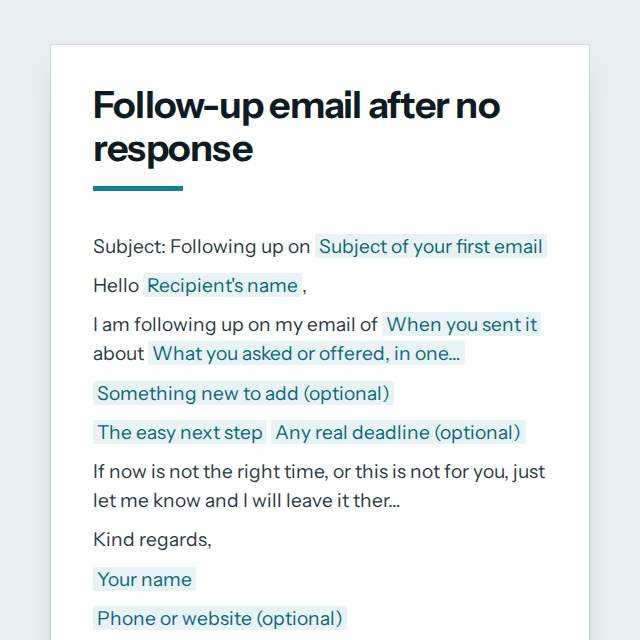
Follow-up email after no response template, first page

Fill it in and preview

Subject: Following up on Proposal for your new website

Hello Mr Haddad,

I am following up on my email of last Tuesday about a quote to redesign the Haddad Dental website, ready to start in January. I know inboxes get busy, so I wanted to bring it back to the top.

I have also put together two examples from similar clinics.

Reply with a good time for a 10-minute call, or just say yes and I will send the details. My January schedule fills up by 15 December.

If now is not the right time, or this is not for you, just let me know and I will leave it there.

Kind regards,
Chloe Martin
+33 6 12 34 56 78

Templates are a careful starting point, not legal advice. Where the law matters, check what applies where you are.

Emails

What this template is for

A polite follow-up email for when no one has replied: remind them of your first message, make the next step easy and give a clear way out. Free to fill in.

It is free to fill in online, needs no account, and downloads as a Word document or a PDF. See all Emails templates

Emails

What you fill in

The form asks for 9 details. The document fills itself in as you type.

  • Recipient's name

    For example: Mr Haddad

  • Subject of your first email

    For example: Proposal for your new website

  • When you sent it

    For example: last Tuesday

  • What you asked or offered, in one line

    For example: a quote to redesign the Haddad Dental website, ready to start in January

  • Something new to add (optional)optional

    A new fact or help makes a follow-up worth opening.

    For example: I have also put together two examples from similar clinics.

  • The easy next step

    For example: Reply with a good time for a 10-minute call, or just say yes and I will send the details.

  • Any real deadline (optional)optional

    Only if it is true.

    For example: My January schedule fills up by 15 December.

  • Your name

    For example: Chloe Martin

  • Phone or website (optional)optional

    For example: +33 6 12 34 56 78

Emails

What is inside

The parts of this document, in order.

  1. 1Subject: Following up on [Subject of your first email]
  2. 2Hello [Recipient's name],
  3. 3I am following up on my email of [When you sent it] about [What you asked or offered, in one line]. I know inboxes ge...
  4. 4[Something new to add (optional)]
  5. 5[The easy next step] [Any real deadline (optional)]
  6. 6If now is not the right time, or this is not for you, just let me know and I will leave it there.

Templates

How it works

  1. 01

    Fill in

    Type your details in the form. The email fills itself in as you type; click any gap to jump to its field.

  2. 02

    Check

    Read it through. Gaps you have not filled stay marked, so nothing goes out half done.

  3. 03

    Send

    Copy it, open it in your email app, or save it as a Word document or a PDF.

Make it yours with AI

Open it in the chat and ask for changes: shorter, firmer, another situation, another language.

Adapt it with nerix

Emails

Questions people ask

What details does this template ask for?

The form asks for 9 details, starting with Recipient's name, Subject of your first email, When you sent it, What you asked or offered, in one line, The easy next step. 3 more are optional.

Can I download this template as Word or PDF?

Yes. When you have filled in the form, copy the email, open it in your email app, or save it as a Word document or a PDF. It is free and needs no account.

Is what I type sent anywhere?

No. What you type stays in your browser while you fill in the document. It only goes to nerix if you choose to open the template in the chat.

What should I check before I use this template?

Follow up once or twice, a few days apart, and stop when someone says no. Repeated unwanted email can break anti-spam rules in some countries, so send only to people you may lawfully contact and honour any request to stop.

Can I send the email straight from the page?

You can copy the finished email or open it in your email app with the subject and message already in place. nerix does not send mail for you from these templates.

Do the templates include a subject line?

Yes. Every email template starts with a subject line written to be clear and short, and you can change it like any other part.

Can I use an email template in another language?

Yes. Open the template in the nerix chat and ask for another language or tone, and check the result before you send it.

Is what I type stored anywhere?

No. The email is filled in inside your browser and nothing you type is sent until you choose to open it in the chat.