Skip to content

Certificate of participation

Thank people for taking part in a workshop, event or course, with a framed certificate for each name on your list.

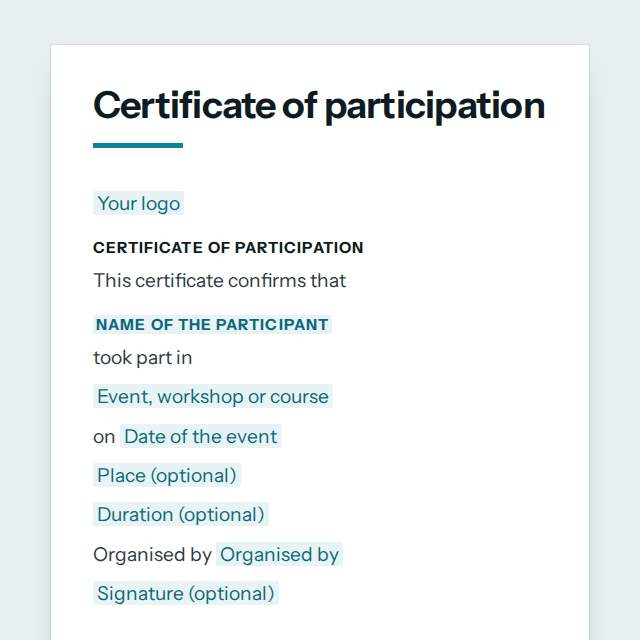
Certificate of participation template, first page

Fill it in and preview

Certificate of Participation

This certificate confirms that

Jonas Becker

took part in

Introduction to Data Skills, two-day workshop

on 18 June 2027

Online and at the Cork campus

12 hours

Organised by Harbour Learning Collective

Sinead Murphy

Workshop Lead

Templates are a careful starting point, not legal advice. Where the law matters, check what applies where you are.

People and HR

What this template is for

A certificate of participation for workshops, events, courses and teams. Add the name, event, date and hours, choose a frame, then print one or a whole list.

It is free to fill in online, needs no account, and downloads as a Word document or a PDF. See all People and HR templates All free certificate templates

People and HR

What you fill in

The form asks for 11 details. The document fills itself in as you type.

  • Your logooptional

    Shown at the top of the document.

  • Name of the participant

    For example: Jonas Becker

  • Event, workshop or course

    For example: Introduction to Data Skills, two-day workshop

  • Date of the event

    For example: 18 June 2027

  • Duration (optional)optional

    For example: 12 hours

  • Place (optional)optional

    For example: Online and at the Cork campus

  • Organised by

    For example: Harbour Learning Collective

  • Signed by

    For example: Sinead Murphy

  • Their role (optional)optional

    For example: Workshop Lead

  • Signature (optional)optional

    Draw it, type it or upload a photo of it.

  • Frameoptional

    A border round the page. Every frame prints well in black and white.

People and HR

What is inside

The parts of this document, in order.

  1. 1This certificate confirms that
  2. 2[Name of the participant]
  3. 3[Event, workshop or course]
  4. 4on [Date of the event]
  5. 5[Place (optional)]
  6. 6[Duration (optional)]

Templates

How it works

  1. 01

    Fill in

    Type your details in the form. The document fills itself in as you type; click any gap to jump to its field.

  2. 02

    Check

    Read it through. Gaps you have not filled stay marked, so nothing goes out half done.

  3. 03

    Download

    Save it as a Word document to edit further, or as a PDF to send or print.

Make it yours with AI

Open it in the chat and ask for changes: shorter, firmer, another situation, another language.

Adapt it with nerix

People and HR

Questions people ask

What details does this template ask for?

The form asks for 11 details, starting with Name of the participant, Event, workshop or course, Date of the event, Organised by, Signed by. 6 more are optional.

Can I download this template as Word or PDF?

Yes. When you have filled in the form, save it as a Word document to keep editing, or as a PDF to send or print. It is free and needs no account.

Is what I type sent anywhere?

No. What you type stays in your browser while you fill in the document. It only goes to nerix if you choose to open the template in the chat.

What should I check before I use this template?

This is a template for your own certificate. It is not an official, accredited or government document and it does not confer a qualification. Do not use it to imitate an exam board, a school authority, a professional body or a regulator. Where a certificate is needed for a visa, a licence or a job, ask the body that sets the rule what it accepts.

Are these HR templates free?

Most are. Fill in and download them for free as Word or PDF, with no account. A few longer documents are premium: free to fill in, paid once to download, and marked with their price.

Do the HR templates follow my country's employment law?

They assume no country's law. Employment rules differ a lot, so each template says where to check local requirements before you use it.

Can a small team use them too?

Yes. They work for a team of two or a company of two thousand, and you can cut any section you do not need in the Word version.