Skip to content

User manual

Write a clear manual for a product or app: setup, use, care, problems and support.

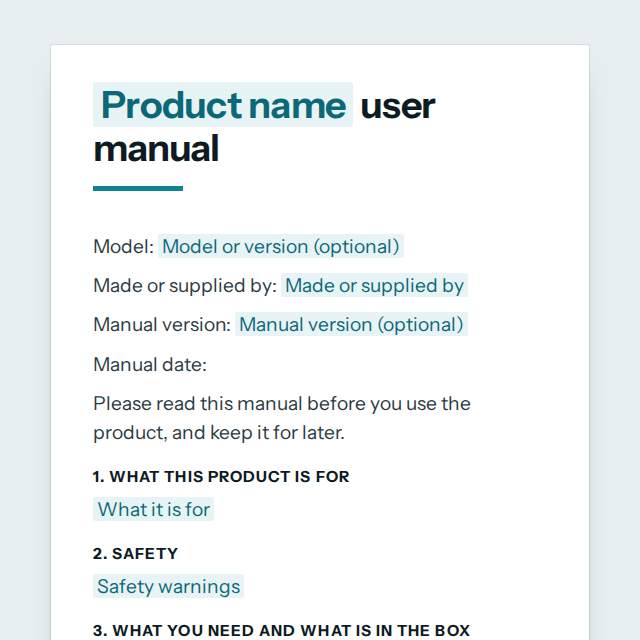
User manual template, first page

Fill it in and preview

BrewMate 500 Coffee Grinder user manual

Model: Model BM-500, version 2.1
Made or supplied by: Kaldera Kitchen Appliances Ltd
Manual version: Edition 3, March 2027
Manual date: 21 November 2026

Please read this manual before you use the product, and keep it for later.

1. What this product is for

Grinding whole coffee beans for home use. It is not made for commercial use or for grinding anything other than coffee beans.

2. Safety

  • Unplug the grinder before you clean it or open the lid.
  • Keep it dry. Never put the base in water.
  • Keep out of reach of children under 8.
  • Do not use it if the cord or plug is damaged.

3. What you need and what is in the box

Before you start:

  • A 230 V socket within 1.5 m
  • A flat, dry surface at least 30 cm wide
  • For the app: a phone with Android 10 or iOS 15 or later

In the box:

  • Grinder base
  • Bean hopper and lid
  • Ground coffee container
  • Cleaning brush
  • This manual

4. Setting up

1. Take the grinder out of the box and remove all packaging.
2. Wash the hopper and the container in warm soapy water and dry them well.
3. Place the grinder on a flat, dry surface near a socket.
4. Fill the hopper with beans and close the lid.
5. Plug in the grinder.

5. Using the product

1. Turn the dial to choose the grind, from 1 (fine) to 10 (coarse).
2. Press and hold the start button. The grinder stops when you let go.
3. Remove the container and pour out the coffee.
4. Do not run the grinder for more than 60 seconds without a pause of 2 minutes.

6. Cleaning and care

Clean after every 5 uses with the brush. Wipe the base with a damp cloth. Wash the hopper and container by hand. Do not use the dishwasher or strong cleaners.

7. Troubleshooting

Problem Possible cause What to do
Grinder does not start Lid not closed or not plugged in Close the lid until it clicks, check the plug and the socket
Grinder stops while running It overheated Unplug it and wait 30 minutes before you use it again

8. Technical specifications

  • Power: 150 W, 220 to 240 V, 50 Hz
  • Hopper capacity: 250 g
  • Weight: 1.6 kg
  • Size: 14 x 14 x 31 cm

9. Terms explained

  • Burr: the grinding part that crushes the beans
  • Hopper: the container that holds the beans

10. Disposal and recycling

Do not throw this product in the household bin. Take it to an electrical recycling point in your area.

11. Approvals and markings

CE and UKCA marked. Conforms to EN 60335-1. Declaration of conformity available on request.

12. Warranty

2 years from the date of purchase. Keep your receipt.

13. Getting help

support@kaldera.example, +44 20 7946 0123, Monday to Friday 9:00 to 17:00. Have the model number ready.

Templates are a careful starting point, not legal advice. Where the law matters, check what applies where you are.

IT and projects

What this template is for

A user manual template for a product or software: safety, setup, how to use it, care, troubleshooting, specifications and support. Fill it in, then Word or PDF.

It is free to fill in online, needs no account, and downloads as a Word document or a PDF. See all IT and projects templates

IT and projects

What you fill in

The form asks for 18 details. The document fills itself in as you type.

  • Product name

    For example: BrewMate 500 Coffee Grinder

  • Model or version (optional)optional

    For example: Model BM-500, version 2.1

  • Manual version (optional)optional

    For example: Edition 3, March 2027

  • Made or supplied by

    For example: Kaldera Kitchen Appliances Ltd

  • What it is for

    For example: Grinding whole coffee beans for home use. It is not made for commercial use or for grinding anything other than coffee beans.

  • What you need before you start (optional)optional

    Space, power, tools, accounts, or the software and system versions it needs.

    For example: A 230 V socket within 1.5 m A flat, dry surface at least 30 cm wide For the app: a phone with Android 10 or iOS 15 or later

  • Safety warnings

    One warning per line. Put the most serious first.

    For example: Unplug the grinder before you clean it or open the lid. Keep it dry. Never put the base in water. Keep out of reach of children under 8. Do not use it if the cord or plug is damaged.

  • What is in the box

    For example: Grinder base Bean hopper and lid Ground coffee container Cleaning brush This manual

  • Set up, step by step

    Number each step. One action in each step.

    For example: 1. Take the grinder out of the box and remove all packaging. 2. Wash the hopper and the container in warm soapy water and dry them well. 3. Place the grinder on a flat, dry surface near a socket. 4. Fill the hopper with beans and close the lid. 5. Plug in the grinder.

  • How to use it

    For example: 1. Turn the dial to choose the grind, from 1 (fine) to 10 (coarse). 2. Press and hold the start button. The grinder stops when you let go. 3. Remove the container and pour out the coffee. 4. Do not run the grinder for more than 60 seconds without a pause of 2 minutes.

  • Cleaning and care

    For example: Clean after every 5 uses with the brush. Wipe the base with a damp cloth. Wash the hopper and container by hand. Do not use the dishwasher or strong cleaners.

  • Troubleshooting

    A problem, why it may happen and what to do.

  • Technical specifications

    For example: Power: 150 W, 220 to 240 V, 50 Hz Hopper capacity: 250 g Weight: 1.6 kg Size: 14 x 14 x 31 cm

  • Terms explained (optional)optional

    Only words the reader may not know.

    For example: Burr: the grinding part that crushes the beans Hopper: the container that holds the beans

  • Disposal and recycling (optional)optional

    For example: Do not throw this product in the household bin. Take it to an electrical recycling point in your area.

  • Approvals and markings (optional)optional

    Only mark what is true and has been tested.

    For example: CE and UKCA marked. Conforms to EN 60335-1. Declaration of conformity available on request.

  • Warranty (optional)optional

    For example: 2 years from the date of purchase. Keep your receipt.

  • How to get help

    For example: support@kaldera.example, +44 20 7946 0123, Monday to Friday 9:00 to 17:00. Have the model number ready.

IT and projects

What is inside

The parts of this document, in order.

  1. 11. What this product is for
  2. 22. Safety
  3. 33. What you need and what is in the box
  4. 44. Setting up
  5. 55. Using the product
  6. 66. Cleaning and care
  7. 77. Troubleshooting
  8. 88. Technical specifications
  9. 99. Terms explained
  10. 1010. Disposal and recycling
  11. 1111. Approvals and markings
  12. 1212. Warranty

Templates

How it works

  1. 01

    Fill in

    Type your details in the form. The document fills itself in as you type; click any gap to jump to its field.

  2. 02

    Check

    Read it through. Gaps you have not filled stay marked, so nothing goes out half done.

  3. 03

    Download

    Save it as a Word document to edit further, or as a PDF to send or print.

Make it yours with AI

Open it in the chat and ask for changes: shorter, firmer, another situation, another language.

Adapt it with nerix

IT and projects

Questions people ask

What details does this template ask for?

The form asks for 18 details, starting with Product name, Made or supplied by, What it is for, Safety warnings, What is in the box. 7 more are optional.

Can I download this template as Word or PDF?

Yes. When you have filled in the form, save it as a Word document to keep editing, or as a PDF to send or print. It is free and needs no account.

Is what I type sent anywhere?

No. What you type stays in your browser while you fill in the document. It only goes to nerix if you choose to open the template in the chat.

What should I check before I use this template?

Some products must carry safety warnings, instructions in the local language or specific markings by law, for example electrical goods, toys, medical devices and chemicals. Check what applies where you sell, and have the safety section reviewed by someone qualified.

Are these IT and project templates free?

Most are. Fill in and download them for free as Word or PDF, with no account. A few longer documents are premium: free to fill in, paid once to download, and marked with their price.

Does a security policy make us secure?

No document does that alone. A policy helps when it matches what people really do, so keep it short, explain it to your team and review it every year.

Is a project charter only for large projects?

No. A small project benefits too, because one page that names the goal, the limits and the decision maker prevents most arguments later.