Skip to content

Store opening and closing checklist

Open and close a store the same careful way every day, with cash, stock, safety and security checked.

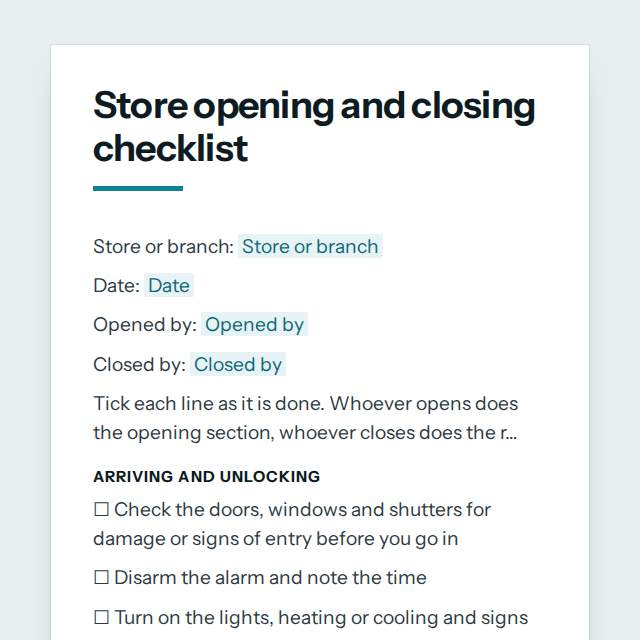
Store opening and closing checklist template, first page

Fill it in and preview

Store opening and closing checklist

Store or branch: Casa Verde Cafe, Lisbon
Date: 17 August 2027
Opened by: Beatriz Santos
Closed by: Kwame Mensah

Tick each line as it is done. Whoever opens does the opening section, whoever closes does the rest.

Arriving and unlocking

☐ Check the doors, windows and shutters for damage or signs of entry before you go in
☐ Disarm the alarm and note the time
☐ Turn on the lights, heating or cooling and signs
☐ Switch on the till, card machine, computers and music
☐ Check fridges and freezers are at the right temperature
☐ Staff roster confirmed and anyone absent covered
☐ Opening done by two people where the store policy requires it

Getting the store ready

☐ Floor and entrance are clean, dry and free of trip hazards
☐ Float counted and checked against the cash book
☐ Shelves, displays and stock are tidy and prices are correct
☐ Deliveries and stock out for sale are checked and put away
☐ Toilets and customer areas are clean and stocked
☐ Staff briefed on offers, targets and who is on break when
☐ Open sign turned and doors unlocked at opening time
☐ Prices, promotions and signs match the till
☐ Online orders, click and collect and returns checked
☐ Fitting rooms, security tags and display cases checked
☐ Date checks done on food or short life stock

During the day

☐ Cash is moved to the safe when the till gets full
☐ Spills and breakages are cleaned straight away
☐ Fire exits and walkways stay clear
☐ Lost property and customer feedback recorded
☐ Fire alarm and emergency exit tests logged on the day they are due

Before closing

☐ Last customers are served and the closed sign is turned
☐ Floor, counters and tables are cleaned and tidied
☐ Stock and perishable items are put away or covered
☐ Rubbish and recycling are taken out
☐ Equipment is switched off and cleaned where needed

Cashing up

☐ Till reports are printed or saved
☐ Cash and card takings are counted and match the reports
☐ Differences are written down with a reason
☐ Takings are put in the safe or the bank bag as the policy says
☐ Float for the next day is set aside
☐ Cash counted by two people or checked by a manager, with both names recorded
☐ Till and sales data backed up or sent to head office

Locking up

☐ Every window, back door and fire door is shut and locked
☐ Lights are off except those meant to stay on
☐ Fridge and freezer doors are closed and temperatures noted
☐ Alarm is set and the time noted
☐ Doors are locked and keys returned to the agreed place
☐ Problems and low stock are left in a note for the next shift
☐ Staff leave together or in pairs, and nobody carries takings alone
☐ Final walk around including toilets, stockroom and fitting rooms

Notes

Items to follow up, who is responsible and by when.

Templates are a careful starting point, not legal advice. Where the law matters, check what applies where you are.

Operations and quality

What this template is for

A store opening and closing checklist for retail and cafes: floor, till, stock, safety, cash up, security and handover. Free to fill in or print.

It is free to fill in online, needs no account, and downloads as a Word document or a PDF. See all Operations and quality templates All free checklist templates

Operations and quality

What you fill in

The form asks for 5 details. The document fills itself in as you type.

  • Store or branch

    For example: Casa Verde Cafe, Lisbon

  • Date

    For example: 17 August 2027

  • Opened by

    For example: Beatriz Santos

  • Closed by

    For example: Kwame Mensah

  • Notes (optional)optional

    For example: Items to follow up, who is responsible and by when.

Operations and quality

What is inside

The parts of this document, in order.

  1. 1Arriving and unlocking
  2. 2Getting the store ready
  3. 3During the day
  4. 4Before closing
  5. 5Cashing up
  6. 6Locking up
  7. 7Notes

Templates

How it works

  1. 01

    Fill in

    Type your details in the form. The document fills itself in as you type; click any gap to jump to its field.

  2. 02

    Check

    Read it through. Gaps you have not filled stay marked, so nothing goes out half done.

  3. 03

    Download

    Save it as a Word document to edit further, or as a PDF to send or print.

Make it yours with AI

Open it in the chat and ask for changes: shorter, firmer, another situation, another language.

Adapt it with nerix

Operations and quality

Questions people ask

What details does this template ask for?

The form asks for 5 details, starting with Store or branch, Date, Opened by, Closed by. 1 more are optional.

Can I download this template as Word or PDF?

Yes. When you have filled in the form, save it as a Word document to keep editing, or as a PDF to send or print. It is free and needs no account.

Is what I type sent anywhere?

No. What you type stays in your browser while you fill in the document. It only goes to nerix if you choose to open the template in the chat.

What should I check before I use this template?

Cash handling, alarm, fire and food hygiene duties differ by country, trade and premises. Add the steps your insurer, landlord and local rules require.

Are these operations templates free?

Most are. Fill in and download them for free as Word or PDF, with no account. A few longer documents are premium: free to fill in, paid once to download, and marked with their price.

Do they meet a standard such as ISO 9001?

They are a practical starting point and certify nothing. Standards and safety laws differ by industry and country, so check what applies to you.

Who should approve a procedure?

The person who owns the process and a manager who can authorise it. The procedure template has fields for both, and for the review date.