Skip to content

Office move checklist

Plan an office relocation from the first decision to the first week in the new space.

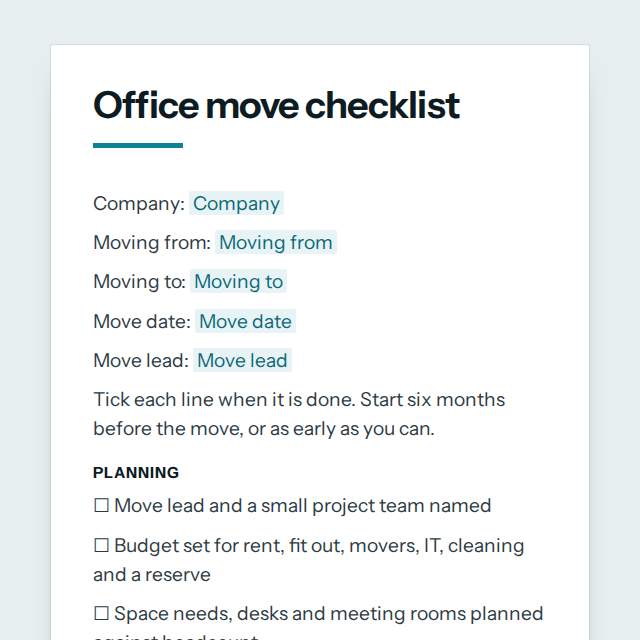
Office move checklist template, first page

Fill it in and preview

Office move checklist

Company: Lindqvist Design Studio
Moving from: 12 Market Street, Manchester
Moving to: Level 5, 80 Harbour Way, Auckland
Move date: 28 March 2027
Move lead: Amal Rahman

Tick each line when it is done. Start six months before the move, or as early as you can.

Planning

☐ Move lead and a small project team named
☐ Budget set for rent, fit out, movers, IT, cleaning and a reserve
☐ Space needs, desks and meeting rooms planned against headcount
☐ Staff told the reasons, the date and how they will be kept informed
☐ Timeline agreed with key dates for each step
☐ Risks and a fallback plan listed, including downtime and delays
☐ Regular updates sent to all staff and clients on the progress

Old and new lease

☐ Notice period and conditions of the old lease checked
☐ Notice given in writing on time and a copy kept
☐ Restoration and repair duties at the old office listed
☐ New lease or licence signed and the move in date confirmed
☐ Building access, parking and delivery rules at the new office obtained
☐ Insurance updated for the new premises
☐ Utilities, meter readings and services closed or transferred at the old office
☐ Fire risk assessment, evacuation plan and fire wardens ready for the new office
☐ Mail redirected and a post plan agreed

IT and communications

☐ Internet, phone lines and power needs booked at the new office
☐ Network, Wi-Fi and security set up and tested before move day
☐ Servers, printers and devices listed with how they will move
☐ Data backed up before anything is unplugged
☐ Phone numbers, email signatures and the website address updated
☐ Old devices wiped and recycled or sold securely
☐ Printers, door access, alarm and cameras connected and tested

Packing and movers

☐ Two or three quotes compared and a mover booked
☐ Boxes, labels and a colour or number code for each team ordered
☐ Staff told what to pack, when, and what to throw out
☐ Confidential papers shredded or moved by a secure route
☐ Furniture and equipment marked for sale, storage or the new office
☐ Floor plan with box and desk labels sent to the movers
☐ Insurance for goods in transit confirmed with the mover
☐ Valuables, cash and sensitive items moved by the company, not packed by the mover

Moving day

☐ Move lead and a site contact present at both offices
☐ Lift or loading bay booked at both ends
☐ Every room checked before the movers leave
☐ Keys, passes and alarm codes handed over
☐ Items checked off against the inventory on arrival
☐ Damage reported and photographed straight away

After the move

☐ Desks, phones and systems tested for each person
☐ Customers, suppliers, bank, insurer and authorities told of the new address
☐ Company registration and invoices show the correct address
☐ Old office cleaned, inspected and keys returned
☐ Staff feedback collected and open problems fixed
☐ Final costs compared with the budget
☐ New office cleaned, signed and reception, signs and wayfinding in place
☐ Remote work or cover plan used for the move week
☐ Moving day lessons recorded for next time

Notes

Items to follow up, who is responsible and by when.

Templates are a careful starting point, not legal advice. Where the law matters, check what applies where you are.

Operations and quality

What this template is for

An office move checklist for a company relocation: planning, lease, IT, packing, moving day and settling in at the new office. Free to fill in or print.

It is free to fill in online, needs no account, and downloads as a Word document or a PDF. See all Operations and quality templates All free checklist templates

Operations and quality

What you fill in

The form asks for 6 details. The document fills itself in as you type.

  • Company

    For example: Lindqvist Design Studio

  • Moving from

    For example: 12 Market Street, Manchester

  • Moving to

    For example: Level 5, 80 Harbour Way, Auckland

  • Move date

    For example: 28 March 2027

  • Move lead

    For example: Amal Rahman

  • Notes (optional)optional

    For example: Items to follow up, who is responsible and by when.

Operations and quality

What is inside

The parts of this document, in order.

  1. 1Planning
  2. 2Old and new lease
  3. 3IT and communications
  4. 4Packing and movers
  5. 5Moving day
  6. 6After the move
  7. 7Notes

Templates

How it works

  1. 01

    Fill in

    Type your details in the form. The document fills itself in as you type; click any gap to jump to its field.

  2. 02

    Check

    Read it through. Gaps you have not filled stay marked, so nothing goes out half done.

  3. 03

    Download

    Save it as a Word document to edit further, or as a PDF to send or print.

Make it yours with AI

Open it in the chat and ask for changes: shorter, firmer, another situation, another language.

Adapt it with nerix

Operations and quality

Questions people ask

What details does this template ask for?

The form asks for 6 details, starting with Company, Moving from, Moving to, Move date, Move lead. 1 more are optional.

Can I download this template as Word or PDF?

Yes. When you have filled in the form, save it as a Word document to keep editing, or as a PDF to send or print. It is free and needs no account.

Is what I type sent anywhere?

No. What you type stays in your browser while you fill in the document. It only goes to nerix if you choose to open the template in the chat.

What should I check before I use this template?

Lease notice, restoration duties, notice to staff and customers, and data protection rules differ by country and contract. Check your lease and local rules before you give notice.

Are these operations templates free?

Most are. Fill in and download them for free as Word or PDF, with no account. A few longer documents are premium: free to fill in, paid once to download, and marked with their price.

Do they meet a standard such as ISO 9001?

They are a practical starting point and certify nothing. Standards and safety laws differ by industry and country, so check what applies to you.

Who should approve a procedure?

The person who owns the process and a manager who can authorise it. The procedure template has fields for both, and for the review date.