Skip to content

Email newsletter

A ready newsletter with a main story, short news, one call to action and an unsubscribe line.

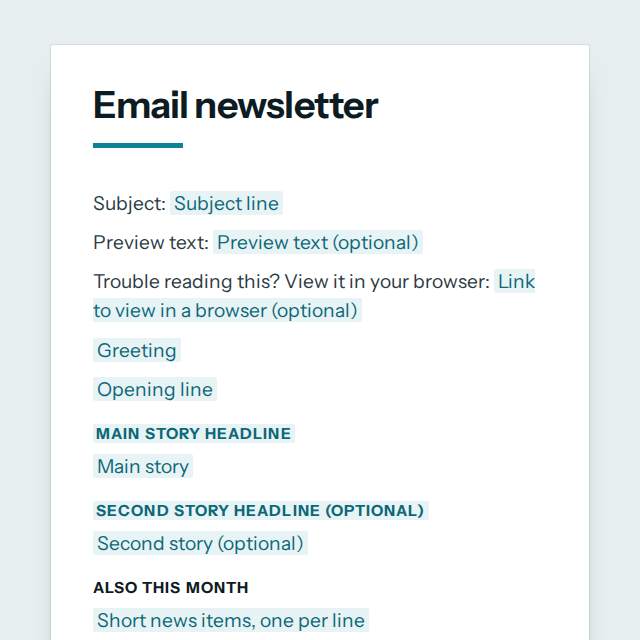
Email newsletter template, first page

Fill it in and preview

Subject: Your March update from Casa Verde Bakery

Preview text: Three new loaves, new Saturday hours and a kids baking class.

Trouble reading this? View it in your browser: https://casaverde.example/news/march

Hello neighbours,

Spring is here, and the ovens have been busy. Here is what is new this month.

Our new sourdough range is here

After six months of testing we are launching three sourdough loaves, baked each morning with flour from a mill 40 km away.

Meet the baker behind the sourdough

Tomasz has baked bread for 22 years. This month he explains why he lets the dough rest for 36 hours.

Also this month

  • Saturday opening hours are now 7:00 to 15:00
  • We now deliver within 10 km on Fridays
  • Kids baking class starts on 14 April

Order your first loaf: https://casaverde.example/order

Thank you for reading.

Marta Ruiz
Owner, Casa Verde Bakery

P.S. Reply to this email with your favourite loaf and we will bake it for Saturday.

You are receiving this email because you signed up for our updates. Sent by Casa Verde Bakery.
Calle del Sol 12, 28012 Madrid, Spain
Unsubscribe at any time: https://casaverde.example/unsubscribe

Templates are a careful starting point, not legal advice. Where the law matters, check what applies where you are.

Sales and marketing

What this template is for

An email newsletter template you fill in online: a clear subject, greeting, main story, short news items, one call to action and an unsubscribe line. Free.

It is free to fill in online, needs no account, and downloads as a Word document or a PDF. See all Sales and marketing templates

Sales and marketing

What you fill in

The form asks for 18 details. The document fills itself in as you type.

  • Subject line

    Keep it under 50 characters so it is not cut off.

    For example: Your March update from Casa Verde Bakery

  • Preview text (optional)optional

    The grey line many inboxes show after the subject. Set it in your sending tool, 40 to 90 characters.

    For example: Three new loaves, new Saturday hours and a kids baking class.

  • Link to view in a browser (optional)optional

    Your sending tool usually makes this link for you.

    For example: https://casaverde.example/news/march

  • Greeting

    A general greeting works for a whole list. Name merging is done in your sending tool.

    For example: Hello neighbours,

  • Opening line

    For example: Spring is here, and the ovens have been busy. Here is what is new this month.

  • Main story headline

    For example: Our new sourdough range is here

  • Main story

    For example: After six months of testing we are launching three sourdough loaves, baked each morning with flour from a mill 40 km away.

  • Short news items, one per line

    For example: Saturday opening hours are now 7:00 to 15:00 We now deliver within 10 km on Fridays Kids baking class starts on 14 April

  • Second story headline (optional)optional

    For example: Meet the baker behind the sourdough

  • Second story (optional)optional

    For example: Tomasz has baked bread for 22 years. This month he explains why he lets the dough rest for 36 hours.

  • Button or link text

    For example: Order your first loaf

  • Link address

    For example: https://casaverde.example/order

  • P.S. line (optional)optional

    A P.S. is one of the most read parts of a newsletter. Use it for a reply prompt or a deadline.

    For example: Reply to this email with your favourite loaf and we will bake it for Saturday.

  • Sender name

    For example: Marta Ruiz

  • Sender role (optional)optional

    For example: Owner, Casa Verde Bakery

  • Business or organisation name

    Readers should see who is sending the email.

    For example: Casa Verde Bakery

  • Business postal address

    Many countries require it in marketing email.

    For example: Calle del Sol 12, 28012 Madrid, Spain

  • Unsubscribe link

    For example: https://casaverde.example/unsubscribe

Sales and marketing

What is inside

The parts of this document, in order.

  1. 1Main story headline
  2. 2Second story headline (optional)
  3. 3Also this month

Templates

How it works

  1. 01

    Fill in

    Type your details in the form. The email fills itself in as you type; click any gap to jump to its field.

  2. 02

    Check

    Read it through. Gaps you have not filled stay marked, so nothing goes out half done.

  3. 03

    Send

    Copy it, open it in your email app, or save it as a Word document or a PDF.

Make it yours with AI

Open it in the chat and ask for changes: shorter, firmer, another situation, another language.

Adapt it with nerix

Sales and marketing

Questions people ask

What details does this template ask for?

The form asks for 18 details, starting with Subject line, Greeting, Opening line, Main story headline, Main story. 6 more are optional.

Can I download this template as Word or PDF?

Yes. When you have filled in the form, copy the email, open it in your email app, or save it as a Word document or a PDF. It is free and needs no account.

Is what I type sent anywhere?

No. What you type stays in your browser while you fill in the document. It only goes to nerix if you choose to open the template in the chat.

What should I check before I use this template?

Send a newsletter only to people who agreed to receive it, and always include a working way to unsubscribe and your business address. Rules on consent differ by country, so check them where your readers live.

Are these marketing templates free?

Most are. Fill in and download them for free as Word or PDF, with no account. A few longer documents are premium: free to fill in, paid once to download, and marked with their price.

Do I need a customer's permission for a case study?

Yes. Get the customer's written approval of the text, the quotes and any logo before you publish. The case study template has a field for it.

Can nerix improve the wording?

Yes. Open the template in the nerix chat and ask for a shorter, warmer or more formal version, then check every fact before you publish.