Gå til innhold

How to run a help desk for a small team

How to run a help desk for two to ten people: one queue, clear owners, reply targets, saved replies and a few numbers worth watching.

nerix-teametPublisert 6 min lesetid

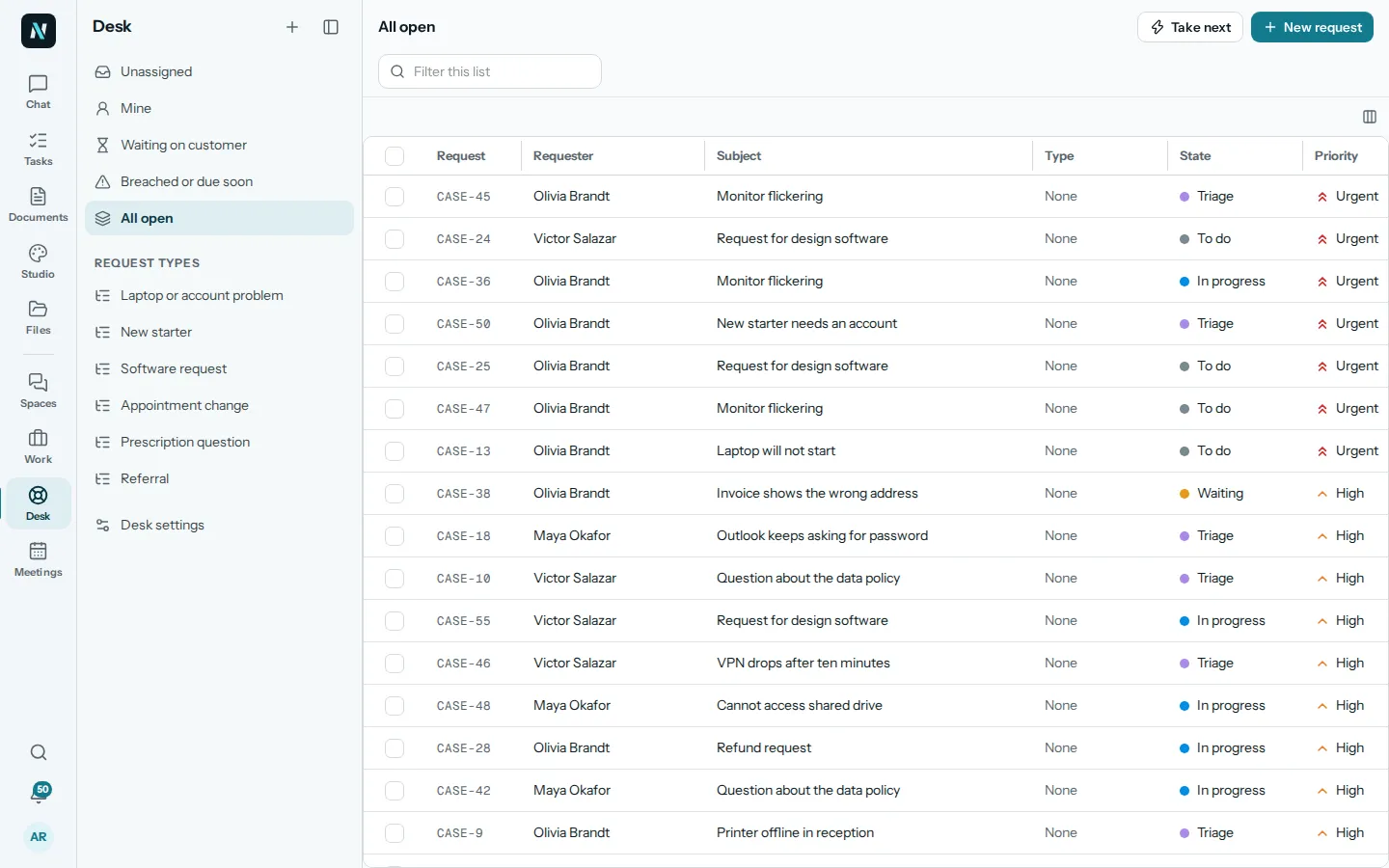
The Desk in nerix showing all open requests as a table, with lists for Unassigned, Mine, Waiting on customer and Breached or due soon, and a Take next button.
I denne guiden

At some point, a shared inbox stops working. Two people answer the same customer. Nobody answers another. A message sits for three days because everyone thought someone else had it. The fix is not a bigger inbox. It is a simple system in which every request has one owner, one status and one deadline.

This guide describes a way to run a help desk with two to ten people, without turning it into a department.

The signs it is time

You probably need a help desk if you recognise any of these:

  • You ask in the team chat, "did anyone reply to this?"
  • A customer writes twice because the first message went unanswered.
  • You cannot say how many requests came in last week, or how long they took.
  • The person who knows the answer is on holiday and nobody can see the history.
  • Requests arrive by email, by phone, in chat and through a web form, and live in four places.

None of these needs a complicated tool. They need one list that everything lands in.

Principle one: one list, every channel

Every request, whatever way it arrives, becomes an item in one place. An email, a form on your website, a phone call someone writes up: all of them are requests with a requester, a subject and a description.

In nerix, the Desk is that list. Customers can write through a portal, a widget on your website or by email once those are set up, and if someone got in touch another way, you can add a request yourself with New request. Staff see all of them together, with lists for the ones that matter most: Unassigned, Mine, Waiting on customer, and Breached or due soon.

The channel matters less than the rule: if it is not in the list, it does not exist.

Principle two: every request has one owner

A request with two owners has none. When a request arrives, someone takes it, and their name goes on it. Everyone can see who, so nobody duplicates work and nobody assumes.

For a small team, a simple way to share the load is a "take next" habit: when you finish something, take the next unassigned request, oldest first. Desk has a Take next button for exactly this, which gives you the next unassigned request. It removes the cherry-picking that leaves the hard requests to age.

Ownership can move. If you are out, or the request needs someone else, hand it over, with a note saying why. The owner field should always answer the question "who is looking at this right now?"

Principle three: public replies and internal notes are different things

Support work involves two conversations: the one with the customer, and the one among the team about the customer. Mixing them is how an internal remark such as "this customer is difficult" ends up in an email.

Keep them separate. In Desk, a Public reply goes to the requester, and an Internal note stays with the team. Use notes freely: what you tried, what you found, who you asked. The next person who picks up the request, or you on a different day, will thank you.

When you need another person's input without bringing them into the customer's thread, a side conversation lets you ask them directly while the request stays in one place.

Principle four: say how fast you will reply, and keep the promise

Customers are more patient than you fear, if they know what to expect. Pick two targets and write them down:

  • First reply: how soon every request gets a human answer. This does not need to be the solution, only an acknowledgement that someone is on it.
  • Solution: how soon you aim to resolve a request, usually by priority.

Choose numbers you can meet on a normal week with your real team, including weekends and holidays. If you promise four hours and manage them one day in three, you have taught customers that your promises mean nothing. A longer target that you keep is worth far more.

Desk shows response targets on each request, First reply and Solution, and collects the ones that are late or close to late under Breached or due soon. Start your day there. If that list is empty, the day is going well.
Principle five: write things once

Most support questions are repeated. Password resets, delivery times, refund rules, how to export data: you will answer these hundreds of times. Write the best answer once, save it, and reuse it.

Saved replies, called macros in Desk, do this. A good macro is not a robotic block of text. It is a well-written reply with blanks for the details, which you read and adjust before sending. The goal is consistency and speed without losing the human touch.

Two habits keep macros good:

  • When you find yourself typing the same answer a third time, make it a macro.
  • When a macro gets a follow-up question, fix the macro.

Some situations need more than a macro. A genuine apology for a mistake should sound like a person wrote it. Our free customer apology email template is a good starting point, and if refunds come up often, a clear returns and refund policy saves everyone time by answering the question before it is asked.

Principle six: close the loop

A request is not finished when you have answered it. It is finished when the customer knows it is finished. Mark a request solved only when the problem is actually solved, and tell them. In Desk, solving a request tells the requester.

Where a request reveals a bug, a gap in your product or a wrong line on your website, make a task for it and link it. Desk sits next to Work, where tasks live, so a problem found in support can become a task with an owner and a date, rather than a complaint that nobody remembers.

What to measure, and what not to

You do not need a dashboard of forty numbers. Four are enough:

  1. How many requests came in this week. To see trends and plan staffing.
  2. How long to the first reply. Is the promise kept?
  3. How long to solution. Where are things getting stuck?
  4. What the top three topics are. These are the things to fix at the source, so people stop asking.

Be careful with measures that reward speed over quality. If you judge people on how fast they close requests, they will close requests. Ask also whether customers had to come back with the same problem.

A simple weekly routine

  • Daily, first thing: check Breached or due soon, then Unassigned.
  • Daily, last thing: make sure nothing is waiting on you that you can answer in five minutes.
  • Weekly, 20 minutes: look at the top topics, add or fix a macro, create tasks for what should be fixed at the source.
  • Monthly: look at the targets. Are they still the right ones?

Setting it up in nerix

The Desk is one of the team places in nerix, alongside Work, Spaces and Meetings. It needs Work and the collaboration features switched on, and people who manage the desk set up request types, the portal, widgets and macros in its settings. You do not have to configure everything on day one. Start with one list, a couple of request types and a handful of macros, and add the rest when the need is real.

What a tool cannot do is decide how your team treats customers. That comes from you: a clear owner, an honest target, a good answer written once, and the habit of closing the loop. The system only makes those habits visible.

Spørsmål folk stiller

When does a small team need a help desk instead of a shared inbox?
When more than one person answers customers and you start asking who is handling a message, whether it was answered, or how long people wait. A help desk gives every request an owner and a status.
What is a good first response time?
It depends on your customers and your hours. Pick a target you can actually meet, publish it internally, and measure it. A target that is missed every day is worse than a longer one that is kept.
Should support talk to customers in a chat tool or by email?
Use whatever your customers already use, but track every request in one place. A message that lives only in someone's personal chat will eventually be lost.

Del denne guiden

Maler til dette

Fyll ut en på nett og last den ned som Word eller PDF. Gratis, uten konto, og det du skriver blir i nettleseren din.

  • Beklagelses-e-post til en kunde

    Si unnskyld på en ordentlig måte: hva som gikk galt, hva du gjorde, hva du tilbyr og hvordan det ikke vil skje igjen.

  • Retur- og refusjonsvilkår

    Fortell kundene hvor lang returfrist de har, hvordan de returnerer og når de får pengene tilbake.

I nerix

Prøv det på ditt eget arbeid.

nerix skriver det første utkastet, svarer fra dokumentene dine med siden hver setning kom fra, og samler teamets arbeid på ett sted. Start med gratisabonnementet.

Les videre