Vai al contenuto

Workflow automation for a small business, what to automate first

Workflow automation for a small business: ten routines worth automating first, how to test one safely, and how to pick between Zapier, Make, n8n and others.

Il team di nerixPubblicato 5 min di lettura

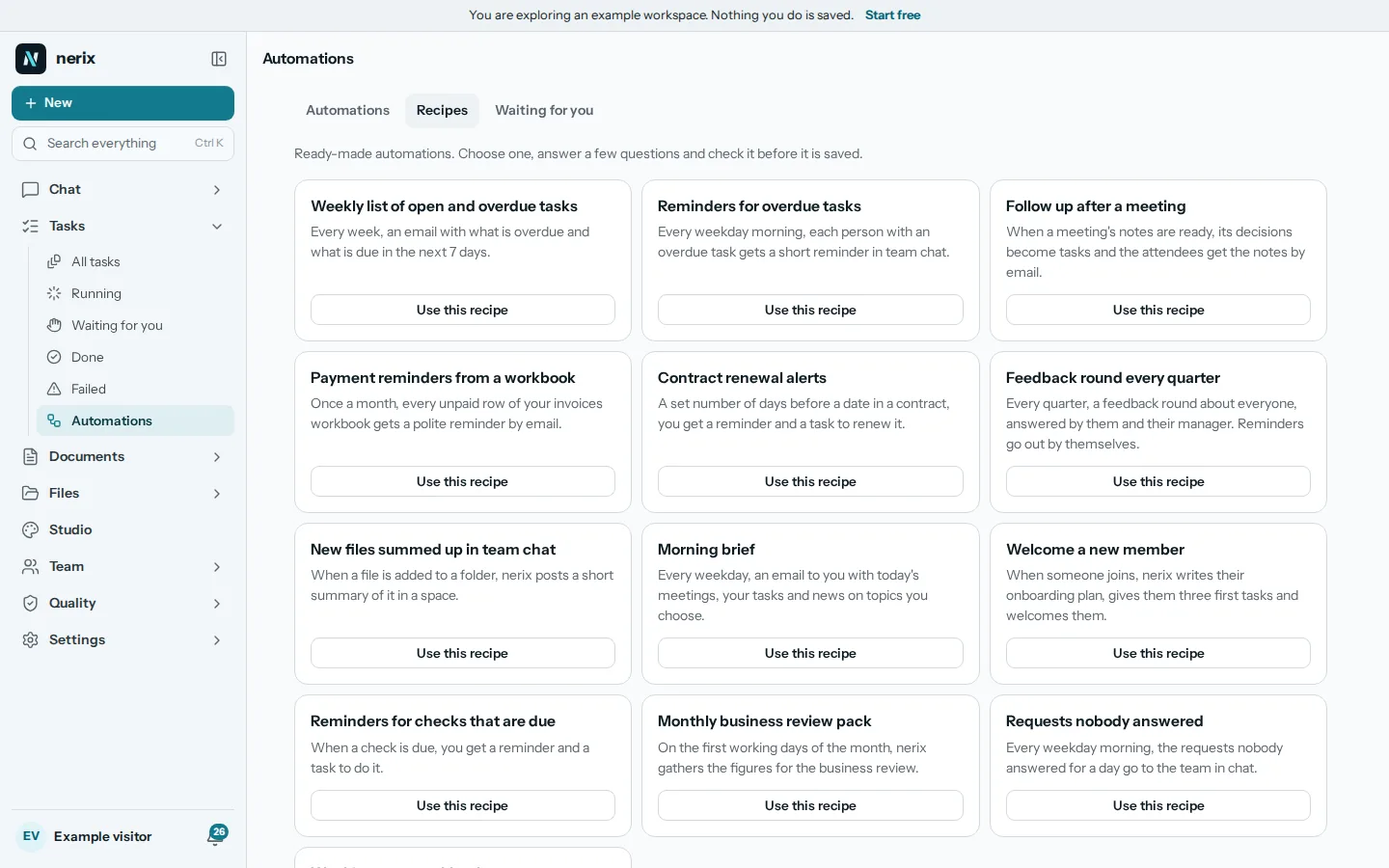
The Automations page in nerix with ready-made recipes, each with a plain description and a Use this recipe button
In questa guida

Workflow automation means letting software do a repeated job when something happens or at a set time, so a person does not have to remember it. For a small business the gain is not clever technology. It is the Monday report that always arrives, the reminder that always goes out and the new hire who always gets the same welcome. This guide lists ten routines worth automating first, shows how to test a rule before you trust it, and ends with how to choose a tool.

Start with the jobs that repeat

A good first candidate has four traits. It happens at least weekly. It follows the same steps each time. A mistake is easy to undo. And someone currently does it from memory, which means it is sometimes forgotten.

Write down every job you did twice this month that felt like chasing. Then sort that list by two questions: how often does it happen, and what is the cost if the automation gets it wrong? Frequent and cheap to get wrong goes first. Rare or expensive to get wrong goes last, or stays manual with a checklist.

Ten routines most small businesses can automate

  1. A weekly list of open and overdue tasks. Every Monday morning, one message with what is late and what is due this week. It replaces a status meeting for many teams.
  2. Reminders for overdue tasks. The owner of a late task gets a nudge, and nobody has to play the nag.
  3. A follow up after each meeting. When a meeting ends, send the notes and the action items to the people who were there. See meeting minutes with AI for what good notes contain.
  4. Payment reminders. A polite note when an invoice passes its due date. Pair it with wording from payment reminder emails that get paid.
  5. Contract renewal alerts. A message 30 or 60 days before a contract ends, so you decide on renewal instead of finding out afterwards.
  6. A welcome for a new team member. The same checklist, accounts and first week plan every time. The 30 day onboarding guide gives the content.
  7. A feedback round every quarter. A short survey goes out on the same day each quarter and the answers come to one place.
  8. A morning brief. What is on today: meetings, deadlines, anything waiting for your answer.
  9. Unanswered requests. If a customer or colleague has waited a day without an answer, flag it.
  10. Month end packs. On the last working day, collect the numbers and tasks you always look at into one document.

None of these needs a custom integration. Most need only a trigger (a schedule or an event), a lookup of your own data, and one message or document.

Keep a person in the loop where it matters

The mistakes people make with automation are rarely technical. They are two kinds. The first is a rule that runs too often, such as emailing the same customer every hour. The second is a rule that sends something to people with no one looking. A few habits prevent both.

  • Test run first. Run the rule on a copy or with a preview that shows what each step would do. Do not let a new rule loose on real customers on day one.
  • Approval for outward messages. Anything that reaches customers or suppliers should wait for a yes from a person until you trust it. Reminders to your own team can go straight out.
  • A cap. Put a limit on how many runs, messages or paid AI calls one rule can make in a month.
  • A log. You should be able to see what ran, when and what it did. When something odd happens, the log is how you find out why.
  • An owner. Every rule has a person who maintains it. Rules with no owner keep running long after the process changed.

What it looks like in practice

In nerix, Automations work this way. You say when a rule starts (a schedule, a date found in your data, or an event such as a file arriving, a meeting ending or a task going overdue) and what happens next, one step after another. There are ready-made recipes for several of the routines above, such as the weekly list of open and overdue tasks, overdue reminders, a follow up after a meeting, payment reminders from a workbook, contract renewal alerts, a quarterly feedback round and a morning brief.

NXFIG0X An automation runs as the person who made it, with only what that person is allowed to do. An email, signing request, post or meeting invite waits for your yes unless you switch on "Send without asking" for that one automation, and it is off by default. A test run shows what each step would do without sending anything. You can set a credit cap per run and per month, and three failed runs in a row pause the rule. Every change and run is kept in its history.

Be aware of the limits. Automations in nerix are in early access as we write this. They act inside nerix and its connected tools, so if your process lives in many outside apps, a dedicated connector service such as the ones below may reach further.

Choosing a tool

The main options for a small business, with prices read on each vendor's page on 1 November 2026. They change, so confirm before you buy.

Tool Strength Free plan Paid from
Zapier Thousands of app connections, easy to start 100 tasks a month, two-step Zaps only About 20 dollars a month (750 tasks, billed yearly)
Make Visual builder, branching and loops 1,000 credits a month Check their page, sources disagree on small plans
n8n Self-hosting, technical teams Self-hosted community edition 20 euros a month for 2,500 executions on cloud, billed yearly
nerix Automations Work already inside nerix, with approval before sending See pricing Part of the plan, AI steps spend credits

How to decide:

  • If your work sits in many different apps, pick Zapier or Make and start on the free plan.
  • If you have a technical person and care about owning the data, look at n8n self-hosted.
  • If the routines are about tasks, documents, meetings and people inside one workspace, a built-in tool avoids another login and another bill.

The two things to read before buying are what counts as a task or a credit (a rule with five steps may use five) and how often a free plan checks for new events. Zapier's free plan, for example, checks every 15 minutes. For deeper comparison see our guide to Zapier alternatives.

The short version

Automate what is frequent, boring and easy to undo. Test every rule, keep a person approving outward messages, cap the cost and keep a log. Start with three routines, watch them for a month, then add more. Pick the tool that already holds the data the rules need.

Le domande più frequenti

What is workflow automation in simple words?
It is a rule that does a repeated job for you, such as "when an invoice is 7 days late, remind the customer" or "every Monday, send me the open tasks". A trigger starts it and one or more steps follow.
What should a small business automate first?
Start with routines that are frequent, boring and low risk, such as weekly task lists, reminders and welcome messages. Leave anything that sends money or reaches many customers until you have watched a rule work for a few weeks.
Do I need to code to automate work?
No. Zapier, Make, n8n and the automations in tools like nerix let you build rules from a form or a diagram. Code only helps when you need something unusual.

Condividi questa guida

In nerix

Provalo sul tuo lavoro.

nerix scrive la prima bozza, risponde dai tuoi documenti indicando la pagina di ogni frase e tiene il lavoro del team in un unico posto. Inizia con il piano gratuito.

Continua a leggere